What is writing to you? Writing can mean many things to different people.
1–Writing is exhausting.
Remembering the rules of syntax and sentence structure is a struggle. Perfection halts our progress putting words to paper.
1–Writing is exhilarating.
Initially, don’t worry about spelling and sentence structure. There is a freedom to words. Getting your struggles and thoughts out of your mind and onto paper clears your head. Once they are released into your world, you can address them. Accomplishing that is a thrilling expression.
2–Writing is personal.
It is risky to write. You expose yourself to others’ judgement. Your self-image becomes vulnerable to criticism. Those are scary moments.
2–Writing is personal.
When you share your words, you share your experience. Others do relate to that. Hearing someone say “I learned from this,” “I was entertained,” and “this made me cry,” is a compliment and a success.
3–Writing is reclusive.
Writing is just between you and your thoughts; nothing else. You have no coworkers or teammates to rely on.
3–Writing is sociable.
Virtual communities of writers understand your struggles. Social media connects people around the globe. Local writing groups strengthen that support. A kind, inquisitive word from a stranger in a coffee shop is supportive and reminds you that you are not alone.
4– Writing is frustrating.
Ideas are fleeting. Motivation rises and falls. You slam into the Writers Block wall over and over and over again.
4–Writing is invigorating.
By declaring, “Writing is worth making the time for,” you choose to commit to yourself. You whisk a reader away into a world you control. You paint with words, drawing scenes in your readers’ minds. Extra incentive comes from the release into the world. It is rewarding to receive a positive review on a reading website or from someone who is not your immediate family network and friends.
5–Writing is limited.
Only a few rare people get a publishing contract. Large publishing houses have limited resources of time, printing, ink, and space. If you do not make a living by writing, then you do not have a “real” job. If you just dabble in your journal, you’re not doing any real writing. Without public validation, all efforts are snubbed as “just a hobby.”
5–Writing is limitless.
If expression is your only goal, then laptops, electronic tablets, journals or paper and pen are all friends. Writing anywhere is accessible. If publishing is a goal, the publishing options range from working with a Big 5 publishing house to a small startup publisher. Self-publishing has become mainstream, be it an eBook, paperback or picture book. You own your options and control your future.
6– Writing is work.
Standard books are long. Whatever your measurement–word count of page length–completing something that complex is a massive task. Revisions take time, a lot of time, and are often disappointing. Writing is intimidating.
6–Writing is work.
There is power in writing the words “The End” on your work.
Sure, we all know that, but too often, we are frozen by the blank screen or paper we call Writers Block. At least, that’s the excuse we tell ourselves.
The only way to break down that wall is to write.
And that brings us back to the beginning. How do we begin writing? Where do we find ideas?
Blog Writing Challenges
Whether you have written or write for a blog, you need some social media presence to maximize this option. People are sharing their creative arsenal to battle the widespread war of writer’s block across the webisphere. These challenges are sites all across the Internet. Your journey is to find them.
I’m a fan of the social media site Twitter. Unlike Facebook, it’s an open media without memberships or restrictions. Connecting with writers and readers and celebrities is a Follow click away. Unlike LinkedIn, it’s not business-focused. Unlike Google+, this is not a new, unknown experiment. Twitter is established, creative and short to swallow with its 140-character limit in each Tweet. It’s easy to find similar topics and groups with a simple #hashtag search.
On the day I wrote this, I found an array of challenges with directed yet general hashtag searches. Some of these lead directly to the moderator’s website, while others simply group posts together under that specific hashtag.
Searching the Twitter hashtag #challenge showed writing and non-writing Tweets. Scrolling through feed, the most relevant ones came from users like @convince to post a photo with every Tweet for one week, @RonovanWriteswith his weekly haiku prompt and @lettrs posing a #WordOfTheDay challenge.
One of my favorite hashtags is #6WordStory, a challenge posed by @Kelsye. Other searches relevant and directed to writers include: #WritingChallenge; #poetrychallenge; #FiveSentenceFiction; #haikuchallenge; and #fictionchallenge.
Twitter is not case-sensitive, so upper- and lower-case usage is personal preference. The words get you to the same location. I like to capitalize some of the longer hashtags to make them easier to read.
The beauty of Twitter is the prompts are provided, and the ideas out there are bountiful. Once you find an inspirational idea, attack that challenge with all your creative energy. Many people link to their personal blogposts, but you don’t need a blog to participate. Create a separate file on your computer and dedicate 15 minutes a day to play with words. Do an email exchange with a friend or family member. If you are uncomfortable sharing, choose a journal to write in for your personal enjoyment.
If you want to publicly share your accomplishments submit these, or parts of it, on your social media or link posts to your personal blog. If you want to make a visual expression of your art, use a smartphone app like InstaQuote or Notegraphy to create a graphic to share with others or save to your camera roll.
Using photos allows your social media reach to increase. The Twitter user @asilartist tied her #9WordStory challenge together by cross-posting from her @reclaimed poet Instagram account. The same hashtag exploration applies there. I found creative posts with the tags: #WritingChallenge; #PoetryChallenge; #threewordstory; #poemaday; #flashfiction; and #4WordStory.
Beware! Most users will use more than one tag, adding several related hashtags so their post can reach various audiences. As your curiosity increases, you will find yourself winding through a maze of related hashtags so that you can forget the original hashtag you started searching for. It’s glorious. It’s frustrating.
There are worse things than being lost in a new tag that connects to a newer tag that inspires you to search for a personal interest of yours. It’s the only way to drag yourself over that tall writers block wall.
These days, it’s a bit of both. As a writer, or anyone with a product to promote, social media presents powerful platforms. You can spend more time socializing than writing, so where do you focus your attention?
Pinterest is a social media cut-n-paste website to collect and save online items meaningful to you. Neater than a folder of newspaper clippings from back in the dinosaur days, when you find an image or idea that you want to remember, you “Pin” that image to a “Board” that you create. Presto! Your collection begins.
The anatomy of a Pin is an image, the description and the website link. The image is the specific, intriguing picture from the website. If the site isn’t set up to instantly open Pinterest when you hover over the image, you can manually add the image to your Board with the Pin It button you download from Pinterest and save to your computer’s internet taskbar. The description is whatever you type in as a reminder to you–a cool title, the inspiration for saving it, your impressions–all in 500 words or less.
The website’s link automatically attaches as an electronic sticky note to the “Pinned from” line, and this takes you back to the original post. If you Pin directly from your smartphone, the Pinned from line simply states, “uploaded by user,” thus creating a static image gallery.
Boards group specific topics or themes together, such as: recipes; parenting; DIY crafts; men’s fashions; travel destinations; and home décor. Quotes and infographics are popular, too. If you want to connect with users—or Pinners—who share your interest, search the site by category, keyword or user names. Here’s where the social aspect steps in.
When you discover an image someone else saved, you can Pin that Pinner’s pin to a Board you created, and vice versa. To see a Pinner’s latest discoveries, you “Follow” that person, and then you choose to follow all or just some of their Boards. The most popular Pins, popular by Likes or Pins, come up highest on any search. It’s important to be social to be discovered.
Remember that, “Pinned from”, direct link I mentioned above? This is where the promotion aspect steps in. You want to send people to where the action is, so create Boards that link directly to your blogsite, etsy shop or Amazon page. Create exciting titles and use the description box wisely. Like other social media, use #hashtags to group your pins and to be instantly site-searchable. Type in an additional website link in the description box, and it is an active link, giving you additional promotion tool option.
Who do I like? Who uses Pinterest well? Who inspires me?
Drive traffic back to your own website like blogger Laurel Regan (Alphabet Salad) by grouping her blog posts, most recently for her April 2015 A to Z Blog Challenge posts. I found her through that blog hop, and she inspired me to create my own A to Z blog posts Board.
Intrigue your current and future readers like writer Wendi Knape (Wendijowrites) does by teasing them with images that inspire her writing. One of her stories, Jacob and Charlotte – Meet Cute, features the characters Jacob and Charlotte. Wendi created a Pinterest Board to describe her characters’ “development, clothes, hair, living space [and] favorite foods.” This inspired me to give readers insights into my own writing process through my “Author Inspiration” board.
My use of Pinterest has been a mixture of art and writing. “Scrapbooking and artsy-fartsy stuff” collects mini-album and ephemera ideas to pitch to my editor of Michigan Scrapbooker Magazine for future articles.
My Zentangle boards promote my classes as a Certified Zentangle Teacher (CZT) and artwork that inspires me. Why not let others know what moves me, as well as inspires my works of art?
“Holiday Festivities” gathers spooky ideas and recipes I use to create great visual images for my blog’s annual Halloween post. See how I used the ideas to create party atmosphere in my 2014 Halloween Party blogpost.
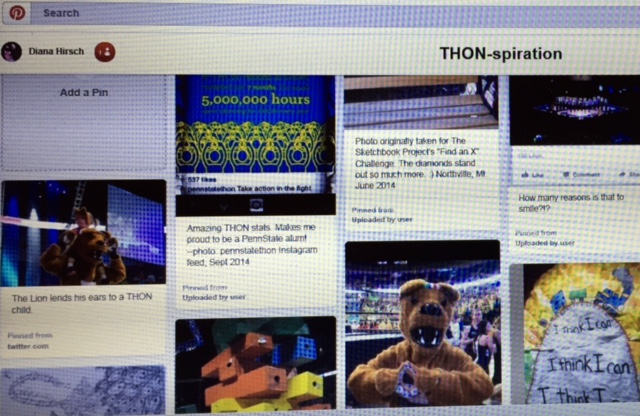
“THON-spiration” collects images related to the fight against childhood cancer and The Penn State Dance Marathon (THON); it is currently my most popular board.
As I was typing this post, I created “Books by D.W. Hirsch” Board. In the first 24 hours, I had 24 followers. How cool is that!
I can’t guarantee any success like that, but I can share tips I’ve discovered along this social journey.
Tips to get the most exposure to yourself and your Boards:
Creative titles. Make your Boards sound so exciting that people can’t resist clicking on them.
Maximize the description box. Don’t write wordy paragraphs; space out long sections of sentences. Include hashtags, keywords, and related websites, but use tabs or double-spaces between these words.
Choose the most interesting, active image to Pin if you have multiple options from a website.
Credit the original artist every time you share personal content. Let them know you’ve done that and they may follow you back.
For more ideas, search a general word. Type the word “writing” and you get subcategories of novel; inspiration; prompts; quotes; and more
Some writing-related Board ideas include:
Writers you like and blogs you follow. Be sure to describe why you include them.
Books you like or want to read. This gives people a look into your personal likes, and they may discover a new book to read after seeing your interests.
Share and be social: promote other bloggers or writers by posting their content.
List blog or writing challenges for future exploration.
Promote personal blog posts. Group these sites into related categories and boards.
Share other media images like screenshots of your Twitter posts. Be mindful of others’ privacy.
Favorite quotes
Pinterest works best for people who actively wander around the Internet. Creating a Board or Pinning an item can take as little as 3 minutes, but this may be an awkward medium for some. It takes time to ensure the correct link, to write an appropriate description, and then roam around Pinterest looking for people to connect and share interests.
What site platform works best for you? Are you still discovering? Share your thoughts in the comments below.
Twitter is stupid, and Instagram is for people who can’t read.”–Max, 2 Broke Girls
I always think of that quote when I mention Instagram to others. Instagram is a social site for sharing snapshots. If you don’t like taking pictures, this post won’t be for you, but you should read to the end just to make sure.
As a writer, or any business owner, you need to find social media platforms that work for you and your desired end goals. The sites need to be ones that you will maintain and that are fun for you. I think Facebook is a big time-suck with algorithms that don’t let me see the feeds of everyone I want to in the order that I want to. Still, I have a Facebook Author Page that I modestly keep up with. I have discovered informative people through Twitter and it seems to be popular for writers. It’s hard to keep up with the news feed some days, but there’s some good interaction with my tweets.
What about Instagram? I’m a scrapbooker and, by default, take hundreds of photos every month. I’m surprised it took me so long to find the value in Instagram. My first two photos posted the week of June 10-16, 2012 (138 weeks ago) when I was just playing around with some filters on my first smartphone. They were pictures of teddy bears. I didn’t know what else to do with it, so I trailed off and lost interest. I picked it up again the week of February 2-7, 2014 (53 weeks ago, or just over a year) as an outlet to showcase my writing, initially my haiku poetry. Now I use Instagram for my writing and…well, stop on over and check out my photos at @dwhirsch.
I use Instagram as a marketing tool as much as a social experience. I don’t pretend to know everything about Instagram. I read information from bloggers who have done the research, such as @jenns_trends, who is a goddess on Insta-information. What I’m offering is my personal experiences and successes adapting those tools.
To use Instagram effectively, you have to decide what you plan to share. This can change over time, but start with some initial rules. My guidelines are the same ones I have for my personal blog. I never post pictures of friends or family without first getting their consent. I don’t post photos of my house because I have “location services” turned on my phone. I don’t want people to know where not to find me when I’m out of town. There’s nothing valuable, explicit, religious, political, controversial or anything my dad–were he still alive–would be disappointed to read about me.
Instagram is Insta-easy to use, and the site’s features are relatively uncomplicated and obsessively playful. It’s free to set up, and I recommend you snag your profile information now: create your Name (generally your real name or business) and Username (what you’ll be known @as). Photos are posted in a square, and most smartphones have a “square” option in the camera settings. If not, or if a square cuts off some important part of your photo, there are many free apps that will shrink your photo and place a border around it. To post, just upload a photo or 15-second video that you take live or have stored in your smartphone library. You can alter your media with black-and-white, sepia or color filters, with additional tools to adjust the image’s brightness, contrast or saturation level. Finish it off with a frame or vignette, add a caption and press Share.
Now that you’re live, how do people find you? Your 153-character bio, along with your photo’s caption, and hashtags need to be creative, potent and relevant. Going back to Max’s quote comparing Twitter and Instagram, the latter is not restricted to 140 characters. Your photo or video should tell a complete story, but you can use about 440 words to explain that image. This comment section is vital because you can tell your story and highlight your image using crucial hashtags.
Instagram is hashtag heaven. People with similar interests will find you based on how you tag your images. Common hashtags reflect those you find on Twitter, but you don’t have to be familiar with Twitter to use Instagram. Think about what your picture is about and tag your image with common terms. As a snapshot in the moment, you can showcase a twisted #tree branch, a royal #sunset, a #selfie in your awesome new #shirt, an art exhibit or the #bananabread you’re baking. You’ll get a feel for tags once you start using them. Tags have no spaces and use just alphabet characters with no suggestions, so type in exactly what you’re looking for. Much like Twitter lists, you can also create hashtags to group your own images in a somewhat folder design. Some of mine include #iamapoetess, #SnuffletFinse and #Champsp. Be sure to check out this group’s posts, which are under the same hashtag as on Twitter: #dwriters.
The Explore tab complements tags by suggesting people to follow based on tags you use, images you’ve ‘Liked’ and people or companies that your followers follow.
Oh, yes, companies use this. Instagram is a successful marketing tool, a highly-used space to display products from #clothing to #cosmetics. Check out companies like @Bathandbodyworks, @Ford and @Applebees.
I sometimes stage my work because I want my followers to see the best of me. I give my followers a peek into my writing, #Zentangle art and my overall creative process while infusing my quirky personality and personal interests. Think about it: if I follow a particular author, I feel more connected to the “person” rather than to the “celebrity.” Therefore, I’ve taken my book cover image and overlaid a part of a review on top of it. I type up actual text from my latest #shortstory or #poetry. Photo editing can be fun.
Given my goals, I show images of blue-inked-up work as I edit my current draft. I show the #coffee shops where I #amwriting. I show the stages of my Zentangle #wip so people can see my creation from start to finish. I have too much fun with it on the go not to let it be organic.
Remember, social media is social. I share my work and myself because like Max on #twobrokegirls, the experience on Instagram is more social. I comment more than I Like because the image doesn’t always grab me but the story in the caption section does. When someone takes the time to comment on my work, I respond to every–and I mean every!–comment made to me even if that person replied with a smiley face emoji. I appreciate the time that person spent appreciating me, similarly the gratitude when I receive a #bookreview on #Amazon or #Goodreads. If nothing else, I reply “Thank you.” People like you when you like them.
What are the benefits? The most important is meeting people with similar interests. I’m reading a #memoir recommended by a follower who is #writing her own memoir. I’m inspired by new #art and #painting techniques. I’ve been challenged to take pictures in #blackandwhite. I could meet any number of them for #coffee if I was in their area. I have a connection to these people. You can do the same with your peers and have fun doing it.